See the change firstThe old and proposed values are visible before any AI explanation.
Case Study 02 · AI interaction systems
What if your CRM could keep up with every customer conversation?
Signal brings CRM updates into the flow of work — understanding what changed and proposing the right record updates or additions without pulling sellers away from the conversation.
Problem
The conversation moves. The CRM waits.
Sellers live in email, meetings and conversations where the real deal context changes. But the CRM often lags behind because updating it means stopping the work, switching context and entering the same information again. The design challenge: bridge those two worlds without asking sellers to change how they already work.
Problem snapshotWhy the CRM falls behind
LIVE CONVERSATIONWhat changed today
✉
Email“The $450K budget has been approved.”
◉
Meeting“We want to start a new rollout.”
✎
Seller note“Sarah is taking over procurement.”
→
Manual handoffContext has to be remembered and re-entered
CRM RECORDWhat the system still knows
Budget$400Kout of date
Close dateSep 30out of date
Procurement leadNot setmissing
New opportunityNot createdmissed
Approach
Bring CRM updates into the flow of work.
Signal should understand what changed in the conversation and turn it into a clear CRM update — from changing a field or adding a stakeholder to creating a new record — while the seller stays in control.
Signal system modelFrom scattered sources to useful seller actions
CONNECTS TO THE SELLER'S WORKSignals come from many places
✉
Emailcustomer conversations
◉
Virtual meetingslive conversation + transcript
in
Sales Navigatorpeople + role changes
⌂
Company websitespublic business signals
✎
Seller notesoffline conversation context
→
✦Signalunderstands what changed
and what it could mean
and what it could mean
→
TURNS CONTEXT INTO ACTIONSignal suggests the next useful move
01Updatekeep known facts current
02Createprepare a new opportunity
03Progresssuggest the next deal stage
04Connectpeople, products and competitors
05Surfacebring useful context to attention
Design principleThe right CRM update, inside the seller’s existing work.
Solution
Bring the CRM update to where the seller is working.
Signal travels with the work. It draws context from connected sources, but each CRM update appears where the seller already is — email, meetings, notes or CRM.
Flow-of-work modelOne intelligence layer, shaped by the surface
THE CORE EXPERIENCE
Signal does not ask the seller to visit an AI destination.
The CRM update appears inside the surface where the work is already happening.
Seller
Alex
moves through the day
EMAILReview a CRM suggestionSignal appears beside the message
VIRTUAL MEETINGCreate a new opportunitySignal opens in the meeting side pane
CRMSee what changedSignal appears in the deal itself
NOTES / VOICECapture offline contextSignal works from the seller's note
1The seller stays in the task
→
2Signal changes shape to fit the surface
→
3The trust model stays the same
Design decisions
Make every CRM update easy to trust.
Before a seller accepts an update, the UI should make the proposed CRM change, its evidence and its consequence obvious.
Interaction anatomyWhat a seller needs before trusting a suggestion
✦ Signal – Suggested CRM updates
Opportunity: Asteron expansion ↗
4 changes
Budget
Explicitly stated
$400K
→
$450K
⌃
✦Evidence
“The $450K budget has been approved.”
Found in this email from Sarah Chen · 8:41 AM
View in email
Evidence stays attachedThe customer’s words, source and time are one step away.
Inference is named“Explicitly stated” is different from “Strong signal” or “Needs review.”
The seller decidesAccept, edit or dismiss keeps the boundary human.
Trust modelObserved → Inferred → Recorded.
Story
Meet Alex, a seller moving through a busy day
Alex moves between email, customer meetings, notes and CRM as conversations change the deal. Signal follows that work quietly — surfacing CRM updates only when the conversation creates something worth recording.
01
Morning
The day starts with an email that changes the deal.
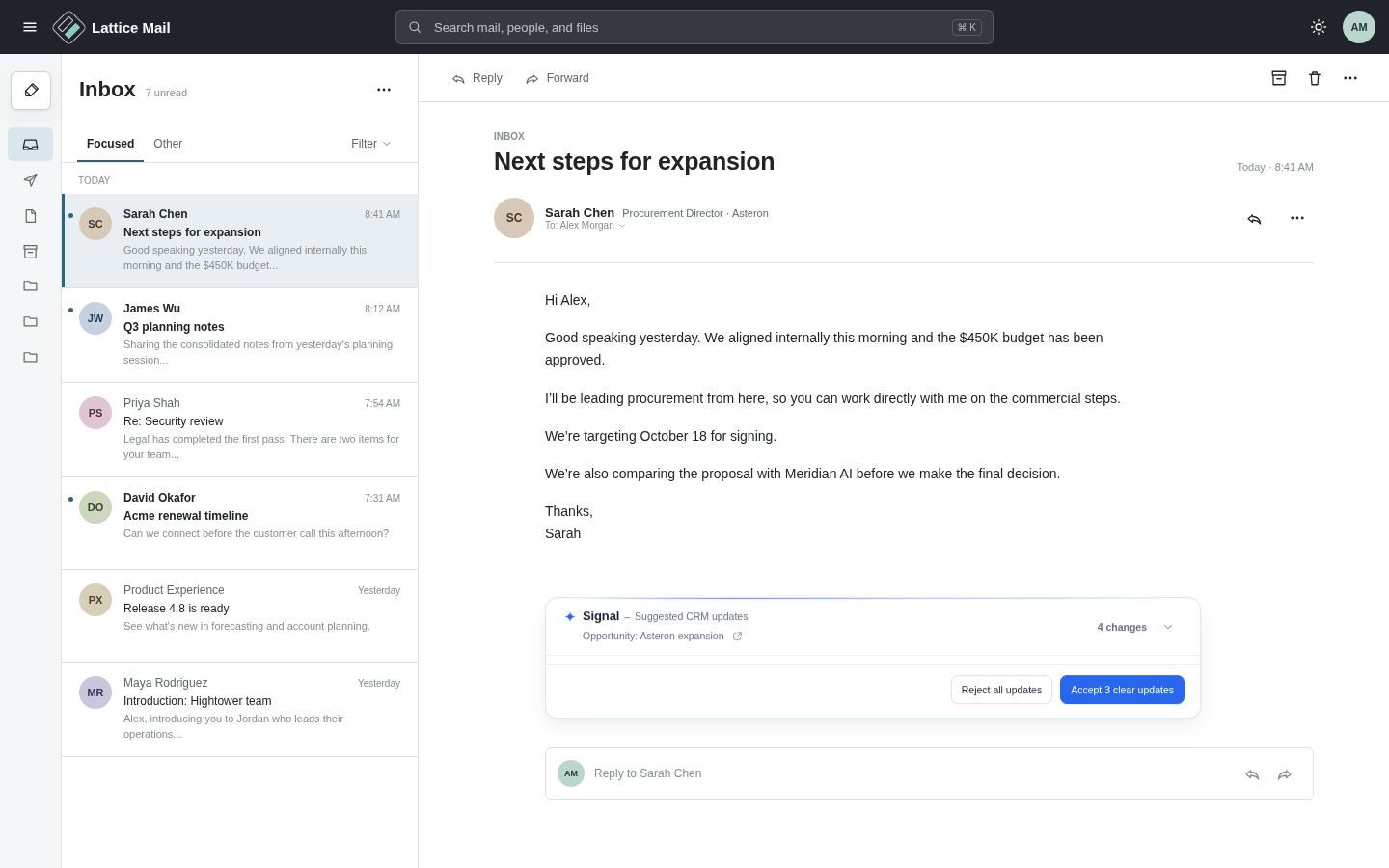
Sarah’s email reveals four updates the CRM does not know yet.
Signal catches those changes inside the conversation, shows exactly where they came from, and lets Alex decide what should become part of the deal.
What Signal found in the email
Four changes, with different levels of certainty.
Try the prototype
Open a suggestion → check the evidence → accept, edit or dismiss.
Email patternMake the decision where the evidence already is.
Afternoon
A coffee before the next customer conversation.
Alex takes a moment to prepare for a meeting with one of his key accounts. The next CRM update will not come from his inbox — it will emerge from the conversation itself.
02
Afternoon
A customer meeting reveals a deal that does not exist yet.
This time, Signal is not updating an existing record. It is helping Alex create a new one.
During a meeting with Asteron, the conversation shifts from exploration to a real rollout. Signal recognizes that the CRM is missing the deal and proposes a new opportunity while the context is still fresh.
NoticeA buying signal appears in the conversation.
ReviewSignal explains why and prepares the required CRM fields.
CreateAlex reviews once. Signal records the opportunity in CRM.
Try the prototype
Wait for Signal → open the suggestion → review the evidence and fields → create or dismiss.
If you ignore it, leave the meeting to see how Signal keeps the unresolved CRM update available for review.
Meeting pattern
Recognize the moment, explain the signal, then let the seller decide — without breaking the conversation.
Evening
Later that evening, Alex meets a customer in person.
As he walks out, the conversation is still fresh. Alex records a quick voice note to capture what was agreed. Once the note is saved, Signal recognizes that the deal has moved forward and brings the next CRM update to him.
03
EveningAn in-person meeting ends. The deal keeps moving.
No CRM app to open. Alex just captures the moment.
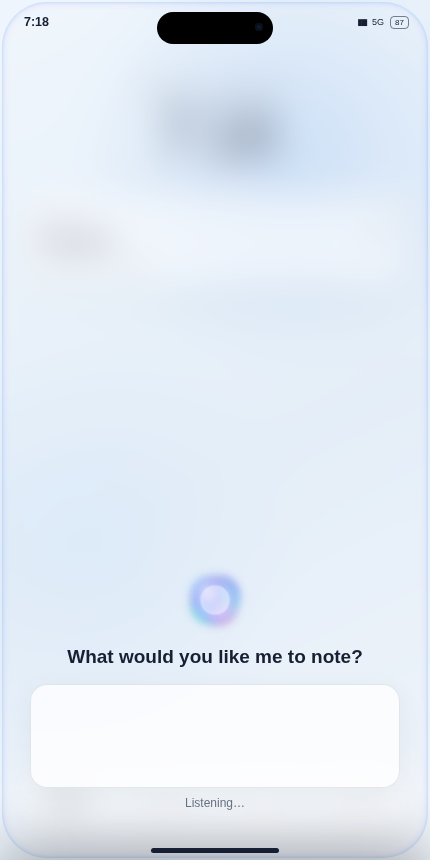
On a work-managed iPhone, Alex can use Siri to save the meeting note without opening the CRM app. Signal uses the connected work context behind the scenes. When the note contains evidence that the deal has progressed, it brings the relevant CRM update to Alex.
Capture naturallyAlex asks Siri to save the customer outcome while it is still fresh.
Signal recognizesThe saved note becomes another signal in the connected work context — no CRM app required.
Act when it mattersSignal surfaces the evidence and suggested stage change for Alex to review.
Try the prototypeLet Siri finish the note → Save note → tap Signal’s notification → review the evidence → Move to Closing.The CRM app never needs to be opened. Siri handles capture; Signal turns the saved context into a reviewable CRM update.
Mobile patternCapture can stay native to the phone. Signal does the CRM thinking in the background and surfaces only the decision that needs Alex.
End of day
Alex finishes where the record lives.
By the time Alex opens the CRM, most of the day is already captured. Signal and the other agents have kept records current; Alex only reviews what still needs judgment.
04
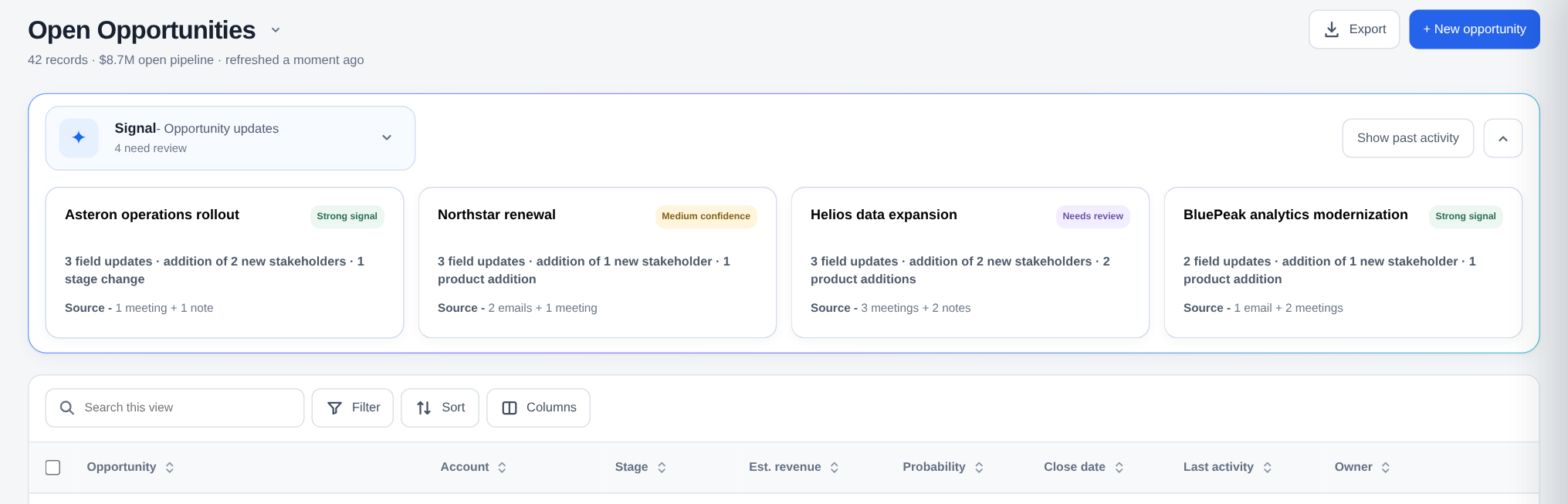
CRMThe system of record becomes the review surface.
The CRM is not another integration surface. It is the product environment around Signal.
Email and meetings show Signal inside other tools. The CRM is different: I designed the product environment around it — the opportunity workspace, record experience, agent model, evidence, review and undo.
Product layerOpportunity workspace + record experience
Agent layerOne place for Signal and other specialized agents
Trust layerEvidence, confidence, review and reversible updates
 123
123
Design principleAgents can do the background work. The CRM should make their work legible, reviewable and reversible — without turning the seller into an AI operator.
Try this prototype
Review what Signal changed — then undo it.
Open Asteron, review an update, accept it, then undo it to see the CRM stay synchronized.
Product outcomes
Less manual effort. A CRM people can trust.
I would measure Signal on whether it reduces seller admin while improving the freshness and completeness of the system of record.
Across the seller’s day.
The work moves. The context stays connected.
Email, meetings, notes and CRM are different moments in a seller’s day. Signal keeps CRM context connected across them — carrying forward what changed, the evidence behind it, and the decisions that still need attention.
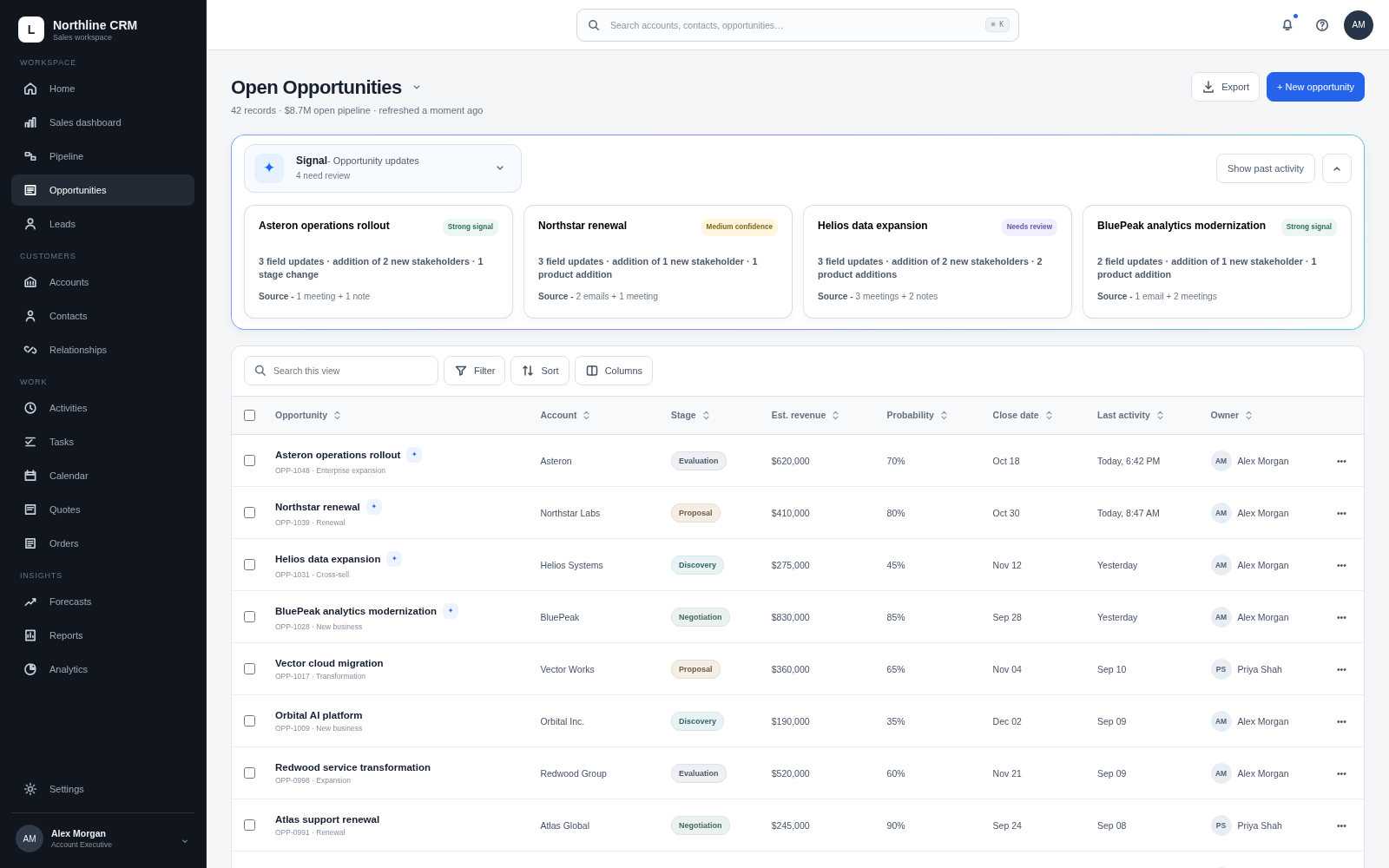
01CRM
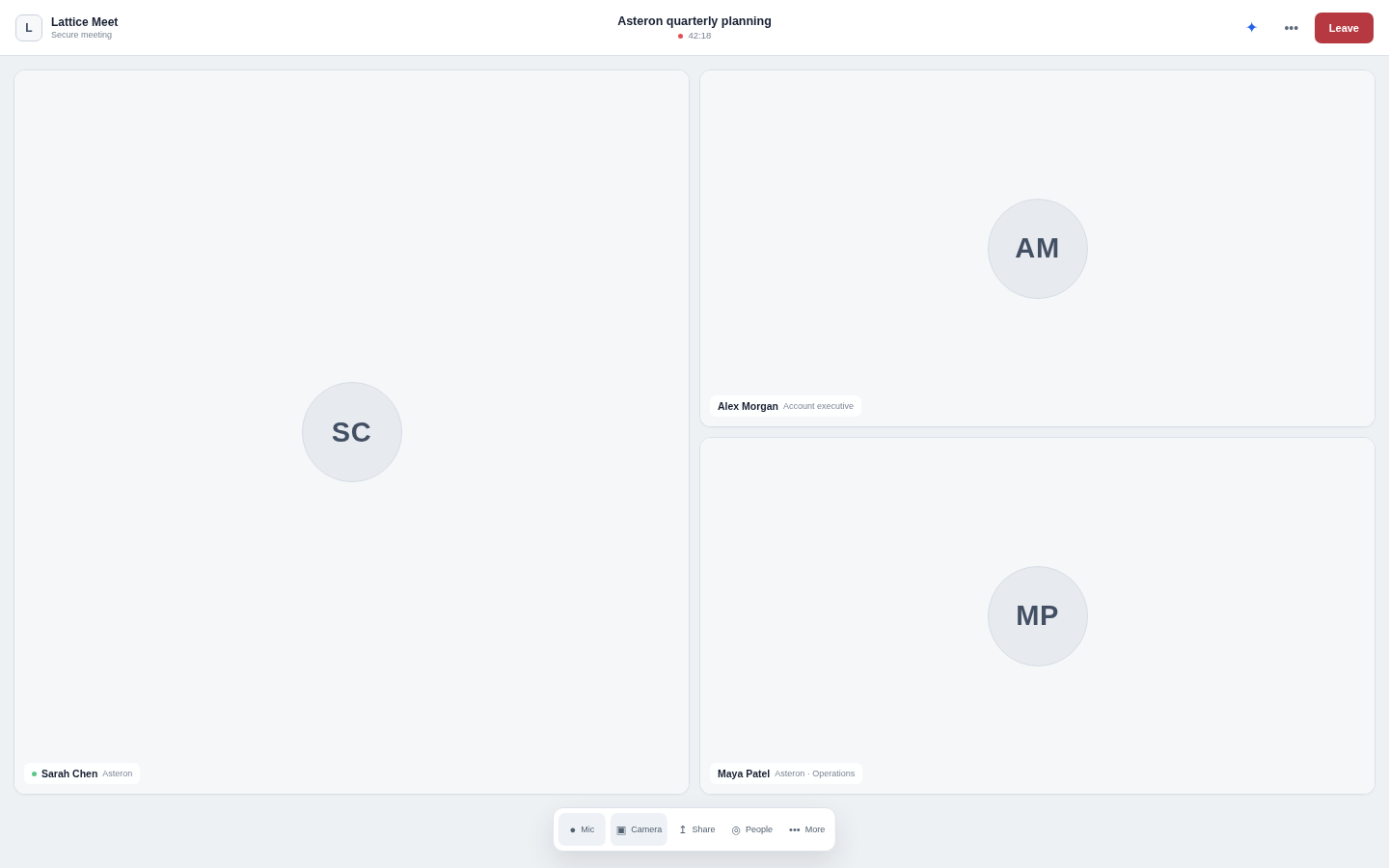
02Meeting
03Email
04Notes
✦
Signal carries the context, not another app.CRM intelligence that stays connected across the surfaces sellers already use.